
Micropls Scam Shield
Scammers need to get onto your computer to do real damage. Micropls Scam Shield watches for exactly that, and tells you the moment remote-access software, unauthorised access or risky changes appear.
Remote-access app detectedJust now
AnyDesk was just installed. Was this you?
New scheduled task2 min ago
Created by an unknown program 2 minutes ago.
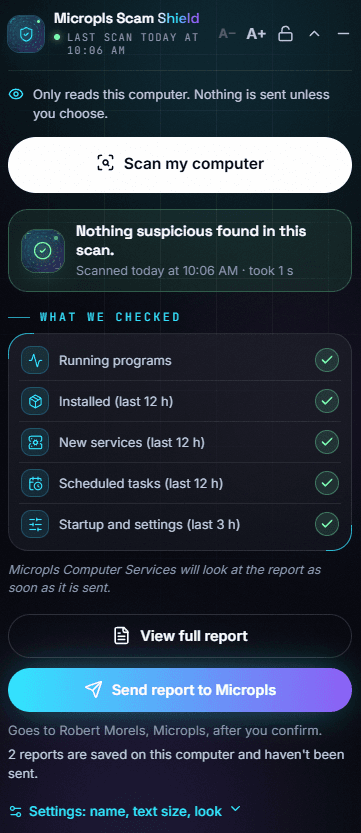
All clear10:06 AM
Nothing suspicious found in today's scan.
What it watches
Antivirus looks for viruses. Scam Shield looks for what scammers do once they're talking to you.
Remote-access software
Alerts you as soon as programs like AnyDesk or TeamViewer are installed or started, the #1 tool scammers use to get in.
Unauthorised access
Flags signs that someone else is using or controlling your computer without your permission.
New programs
Spots software that has just been installed, so nothing sneaks on while you're on the phone to a 'helpful' caller.
New services
Catches hidden background services, a common way scammers keep coming back after they hang up.
Scheduled tasks
Finds tasks set up to run on their own, often used to reinstall scam software after it's removed.
Startup & settings changes
Notices risky changes to what starts with your computer and to important security settings.
How it works
- 01
We install it
During your Scam Check visit (or remotely), your technician installs and sets up Micropls Scam Shield.
- 02
It keeps watch
It quietly watches for remote-access software, new programs and risky changes, day and night.
- 03
You're alerted
If something suspicious appears you're told straight away, and one tap sends the report to us.
- 04
We step in
A technician reviews it and helps you lock things down, remotely or at your door.
One-tap scan
Press “Scan my computer” any time and get a plain-English answer in seconds.
Private by design
It only reads your computer. Nothing is sent anywhere unless you choose to send it.
Straight to your technician
Send the report to Micropls with one button and a technician looks at it as soon as it arrives.
Easy to read
Big, clear text you can make larger, with simple ticks so you know everything is OK.
Download it now, or let us set it up for you.
It's also included with every Scam Check & Protection visit and Scam Shield membership.
FAQ
Can't find what you need? Ask our AI assistant or call 0468 609 702, any time, 24/7.
It's a small program we install on your computer that watches for the changes scammers make: remote-access software, new programs, hidden services, scheduled tasks and startup or settings changes. If something suspicious appears, it alerts you so you can act before any harm is done.