
Install
Download it below and follow the simple steps. Or call us and a technician will talk you through it, or set it up for you.
Using a Mac, phone or tablet? Scam Shield is for Windows. We protect other devices during a Scam Check.
Only ever download Scam Shield from micropls.com/install. We will never ask you to install anything during an unexpected call, text or pop-up. If someone does, hang up and call us on 0468 609 702.
- 1
Download
Press the Download button. The file MicroplsScamShield.exe saves to your Downloads folder.
- 2
Open it
Click the file in your browser's downloads list, or open your Downloads folder and double-click it.
- 3
If Windows shows a blue warning
You may see “Windows protected your PC”. This shows for new programs. Only if you downloaded it from micropls.com: click “More info”, then “Run anyway”. Not sure? Stop and call us.
- 4
Install
Follow the setup screens and click Install. It only takes a minute.
- 5
Scan
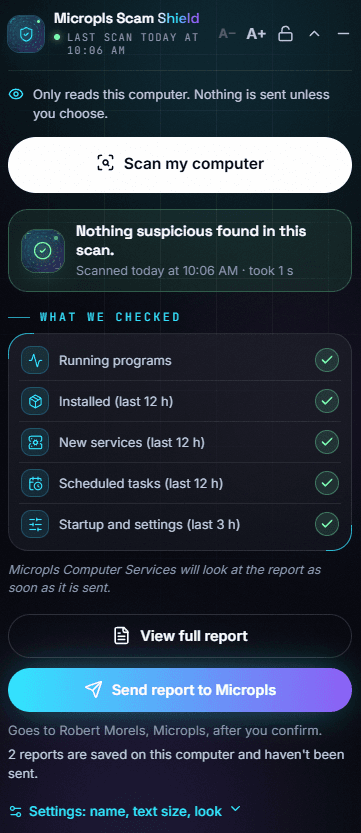
Open Micropls Scam Shield and press “Scan my computer”. You should see “Nothing suspicious found”.
Rather we did it? We'll install and set it up for you, remotely or at your door.
For technical users: check the file is genuine
The SHA-256 fingerprint of MicroplsScamShield.exe (version 1.1.0) is:
8F7F964C7CC6CAD66D8B5DBC0E9772D3B5240C35523629443FD2B5B8BC47B14BIn PowerShell: Get-FileHash .\MicroplsScamShield.exe -Algorithm SHA256
Remote-access app detectedJust now
AnyDesk was just installed. Was this you?
New scheduled task2 min ago
Created by an unknown program 2 minutes ago.
All clear10:06 AM
Nothing suspicious found in today's scan.